 Using Logo to create a tessellation from a star motif Using Logo to create a tessellation from a star motif
Download MSW Logo
Online resources: Basic introduction to using Logo programs, More advanced
help, Programming
resources
Triangular motif tessellation
Programs
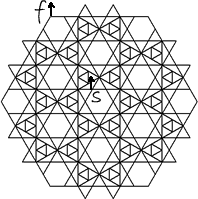
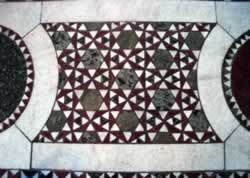
The photo on the right shows some of the Cosmati tiling in Westminster Cathedral. The programs on this page tessellate the star motif with hexagons in this tiling in a radial (hexagonal) direction. They were created to accompany an article written for the Journal of Mathematics and the Arts, special edition for teachers.
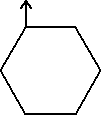
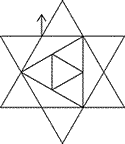
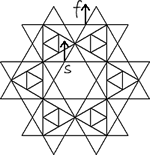
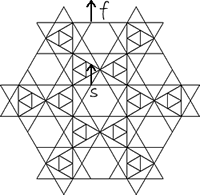
The table summarises the procedures, and what each one does, together with the point on the figure created at which the cursor starts and finishes (useful information if you plan to put procedures together to create larger programs). Images showing the figure created by each program can be seen with the programs. All the procedures use the variable a, which is the side length of the smallest equilateral triangle.
You can see the stages of the tessellation by using this display program (18 is a good side length for this), and the star and hexagon of which it is made by using this display program (70 is a good side length for this).
Executing the programs
- Open Logo
- Click Edall on the Commander
- Copy the program into the editing panel
- Select File>Save and exit
- Type the program name followed by the side length required without a colon (suggested values given in the table)
- Click Execute or press Enter
Other useful information:
- To clear the screen, use the command cs (clear screen)
- To hide the cursor (turtle), use the command ht (hide turtle), to show the cursor use the command st (show turtle)
- To see the program step by step, select Step before clicking Execute
|
Suggested value for a |
Brief description |
|
100 |
small equilateral triangle, vertex pointing upwards |
|
100 |
hexagon, with horizontal base |
|
100 |
6-pointed star, with equilateral triangles in the hexagonal centre |
|
50 |
stars tessellated around a central hexagon |
|
50 |
second layer of stars and hexagons added around startess |
|
30 |
third layer of stars and hexagons added around startess2 |
Top
Programs
Start and finish positions are added - they will not appear when the programs are executed.
to triangleu :a
rt 30
repeat 3[fd :a rt 120]
lt 30
end
Top
|
|
to hex :a
rt 90
repeat 6[fd :a rt 60]
lt 90
end
Top
|
|
to star :a
repeat 6[triangleu :a
pu rt 90 fd :a lt 30 pd]
pu rt 30 bk :a pd
triangleu :a*(sqrt(3))
pu rt 30 fd :a*(sqrt(3))/2 rt 30 pd
triangleu :a*(sqrt(3))/2
pu lt 120 fd :a/2 rt 30 pd
end
Top
|
|
to startess :a
hex :a
pu rt 30 fd :a*2 lt 30 pd
repeat 6[star :a pu rt 90 fd :a rt 60 fd :a*2 lt 90 pd hex :a]
end
Top
|
|
to startess2 :a
startess :a
pu lt 30 fd :a*2 rt 30 pd
repeat 6[hex :a pu rt 90 fd :a*3 lt 30 pd star :a pu rt 90 fd :a*2 lt 90 pd]
end
Top
|
|
to startess3 :a
startess2 :a
pu lt 90 fd :a*2 rt 60 fd :a*2 rt 30 pd
repeat 6[hex :a pu rt 90 fd :a*3 lt 30 pd star :a
pu rt 30 fd :a lt 90 pd star :a pu rt 90 fd :a*3 lt 30 pd]
end
Top
|
|
to displaystartess :a
cs ht
pu lt 90 fd 400 rt 90 pd
star :a
pu rt 90 fd :a*8 lt 90 pd
startess :a
pu rt 90 fd :a*12 rt 60 fd :a*2 lt 150 pd
startess2 :a
pu rt 90 fd :a*16 rt 60 fd :a*4 lt 150 pd
startess3 :a
end
Top
|
|
to displaystartess2 :a
cs ht
pu lt 90 fd 300 rt 90 pd
triangleu :a
pu rt 90 fd :a*4 lt 90 pd
hex :a
pu rt 90 fd :a*5 lt 90 pd
star :a
end |
|
|